
Modern security cameras can do much more than just record video. One of the greatest advantages they have is the ability to detect movement and alert you to it. Motion alerts are the alerts that notify business owners, homeowners, and property managers when movement occurs in a monitored area. Rather than constantly monitoring live video feeds, users can customize to receive immediate notifications on their smartphone, tablet, or computer of activity.
Security is enhanced by motion alerts, which enable users to react rapidly to potential dangers, track deliveries, keep an eye on loved ones, and track activity around a property. Knowing the mechanism behind motion alerts can help users determine camera settings to better suit their needs, minimize false alarms, and maximize the effectiveness of their cameras.
How Motion Detection Works
The motion alerts start with motion detection technology. A security camera keeps a constant eye on the area in front of its lens. The software in the camera compares the video images from one frame to the next.
The procedure is usually the following:
The camera records video footage.
The software takes each frame to analyze.
Pixel or heat changes are detected.
The camera is used to detect if the movement is in the alert area.
A notification is generated.
When movement is detected, the camera immediately analyzes the activity and sends an alert to the user through a connected mobile device or monitoring platform. This process takes place within seconds, allowing homeowners and businesses to respond quickly to potential security concerns. With motion detection cameras installation kansas city, property owners receive timely notifications only when activity occurs, helping reduce unnecessary recordings while maintaining awareness of important events around the property.
Types Of Motion Detection Technology
Various kinds of security cameras have various motion detection systems.
Video Motion Detection
Video motion detection is based on image analysis.
The camera will take each video frame and compare it to the last frame, searching for changes in pixels.
Some forms of movement that can be detected are:
People walking
Vehicles moving
Doors opening
Objects being moved
This method is widely used in indoor and outdoor cameras.
Passive Infrared (PIR) Sensors
Passive Infra Red (PIR) technology is used by some cameras.
PIR sensors are heat detectors that are sensitive to the heat emitted by living organisms.
These sensors are sensitive to:
Human body heat
Animal body heat
PIR sensors are heat-detecting cameras, which means that they generate fewer false alarms than video motion detection.
AI-Based Motion Detection
The cameras used by a lot of people today feature artificial intelligence.
AI-powered systems can identify specific objects and activities.
Examples include:
Person detection
Vehicle detection
Pet detection
Package detection
Facial recognition
AI also filters out false alarms by distinguishing between hazardous and harmless movement.
What Happens When Motion Is Detected?
When the camera detects movement, it performs a series of automatic movements.
Recording Starts
When motion is detected, many cameras start recording.
The video can be stored on:
Cloud storage
SD cards
Hard drives
Network Video Recorders
This guarantees that significant events can be recorded.
Notification Is Sent
The camera notifies the user via the linked application.
Users may receive:
Smartphone notifications
Text messages
Email alerts
Smart home notifications
Actually, the alert will usually contain the time and location of the detected activity.
Snapshot Capture
There are some cameras that will capture still photos when there is motion.
This snapshot could be included with the notification so users can easily see if they need to take any further action.
Additional Security Responses
Advanced systems can also:
Activate sirens
Turn on floodlights
Lock doors
Trigger alarm systems
They are actions that assist in the strengthening of property security.
How Motion Alerts Reach Your Phone
If it detects motion, the camera will send the event data to the cloud server or mobile app.
The process is as follows:
Motion is detected.
The camera makes an event record.
Communication is done via the internet.
The mobile app is alerted.
A message is sent to the user.
The whole process normally only takes a few seconds.
Motion Sensitivity Settings
The majority of security cameras have settings for how sensitive or non-sensitive they are to motion.
Sensitivity is a measure of how much movement it takes for an alert to fire.
High Sensitivity
The high sensitivity setting allows it to detect even small movements.
Advantages:
Increased awareness
Faster detection
Disadvantages:
More false alerts
Frequent notifications
Low Sensitivity
Lower sensitivity settings mean that greater motion is needed to alarm.
Advantages:
Fewer unnecessary alerts
Improved notification accuracy
Disadvantages:
The small movements may be overlooked
It’s essential to strike a balance when monitoring.
Motion Detection Zones
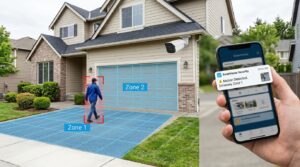
There are many modern cameras with customizable motion zones. Motion zones enable the user to specify motion zones in the camera’s field of view.
For example, a homeowner may choose to monitor:
Front walkways
Driveways
Entry doors
Meanwhile, they can remove:
Public roads
Sidewalks
Neighboring properties
Motion zones allow for the minimisation of false alerts, which are triggered by irrelevant motion.
Common Causes Of False Motion Alerts
Although motion detection is very effective, it can give false alarms.
Common causes include:
Move Trees And Plants To A New Location
Motion detection can be caused by wind-blown branches and leaves.
Shadows And Sunlight
Movement may be detected due to changing lighting conditions.
Small Animals
Some cameras can be triggered by birds, squirrels, and pets.
Weather Conditions
Unnecessary alerts could occur during rain, snow, and storms.
Insects
Motion events can be triggered by bugs in close range to the camera lens.
Benefits Of Motion Alerts
There are a number of benefits to motion alerts over continuous monitoring.
Improved Security
Users are informed as soon as they are detected to be active.
Faster Response Times
Quick alerts enable homeowners to investigate incidents in a timely fashion.
Reduced Storage Usage
Motion-triggered recording saves space by recording only what is relevant.
Convenience
Users need not constantly watch live video streams.
Remote Monitoring
These notifications may be sent from nearly any place that can be accessed by the internet.
Tips For Optimizing Motion Alerts
To improve performance:
Position cameras carefully.
Avoid aiming cameras at busy streets.
Adjust sensitivity settings.
Use motion zones.
Prevent camera lenses from getting dirty.
Regularly update camera software.
If possible, use AI detection capabilities.
Such changes can help enhance alert accuracy.
Conclusion
Motion alerts are triggered by the motion detection technology installed in a camera, which detects movement within the camera’s field of view and alerts the user to the movement. From video analysis to artificial intelligence, today’s security cameras can sense movement with speed and precision. When motion is detected, the system can take video, take photos, turn on security functions, and notify a user’s device. Adjusting the sensitivity settings, zones of detection, and smart detection settings can minimise false alarms and maximise the effectiveness of a security camera system.
FAQs
1. What Triggers A Motion Alert On A Security Camera?
A motion alert is triggered when the camera detects movement through video analysis, heat detection, or AI-based recognition technology.
2. Can Motion Alerts Work Without Internet Access?
The camera may still detect motion and record locally, but internet access is usually required to send notifications to mobile devices.
3. How Can I Reduce False Motion Alerts?
You can reduce false alerts by adjusting sensitivity settings, creating motion zones, and enabling AI-based person or vehicle detection features.